

These resources are intended to help teachers find reading passages, help students practice word recognition and vocabulary, and in general promote literacy.
In a now hugely-digital world, physical resources are, ironically, more and more in-demand. There’s simply too much information visible (and accessible) to keep up with everything. This isn’t so much an argument against online literacy resources, but rather to try to be more selective with what we use.
Find a resource for your next lesson
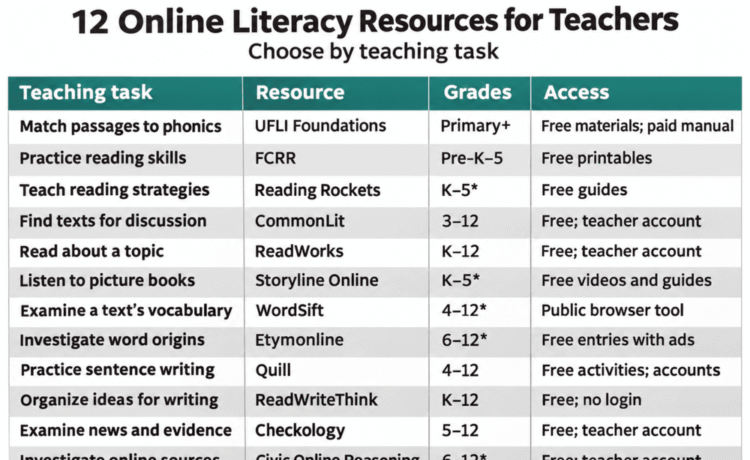
| Teaching need | Resource | Grade range | Access |
|---|---|---|---|
| Find passages that match taught phonics patterns | UFLI Foundations Toolbox | Primary grades; intervention in older grades | Free companion downloads; lesson manual sold separately |
| Prepare partner or independent reading activities | FCRR Student Center Activities | Pre-K–5 | Free printable materials for noncommercial educational use |
| Find directions for teaching a reading strategy | Reading Rockets | Suggested K–5 | Public strategy guides; students do not need accounts |
| Find texts for close reading and discussion | CommonLit Text Library | 3–12 | Free library; educator account for full access |
| Find related passages on a topic | ReadWorks | K–12 | Free educator account; print or digital assignments |
| Use a recorded picture-book read-aloud | Storyline Online | Suggested K–5, depending on the book | Free videos and guides; no account needed for viewing |
| Examine vocabulary before teaching a text | WordSift | Suggested 4–12 with teacher modeling | Public browser tool; no registration advertised |
| Investigate word origins | Online Etymology Dictionary | Suggested 6–12 | Free web entries with ads; paid ad-free option |
| Practice sentence construction and revision | Quill | 4–12; depends on the activity | Free activities; accounts for assigned digital practice |
| Organize ideas before drafting | ReadWriteThink | K–12; depends on the tool | Free resources; no logins |
| Teach news literacy | Checkology | 5–12 | Free educator account; student accounts needed for assigned interactive lessons |
| Teach students to investigate online sources | Civic Online Reasoning | Suggested 6–12 | Free downloads through a teacher account |
Foundational reading and practice
1. UFLI Foundations Toolbox
Best for: Finding decodable passages that match phonics patterns students have already learned. The Toolbox also includes lesson slides, home-practice sheets, and games.
Try it: After teaching a spelling pattern, use the corresponding passage. Have students reread difficult words, then read the passage again.
Access: Free companion materials. The lesson plans are in a separately purchased manual.
Open the UFLI Foundations Toolbox · Program and manual information
2. FCRR Student Center Activities
Best for: Finding printable partner or independent activities for practicing phonological awareness, phonics, fluency, vocabulary, and comprehension. Materials include objectives, directions, and student resources.
Try it: After teaching common prefixes and suffixes, select an affix activity. Ask partners to explain how each word part changes the meaning of the word.
Access: Free downloads for noncommercial educational use. Students use the printed materials without accounts. Some activities require cutting out cards or preparing other materials.
Before planning: FCRR currently reports broken activity links and directs users to its Resource Database. Check that you can download the activity you want.
Browse FCRR activities · Search the Resource Database
3. Reading Rockets Classroom Strategy Library
Best for: Finding directions for teaching a particular reading or writing strategy. Entries include examples and research references; many also provide videos or downloadable materials.
Try it: Choose a summarizing strategy and model it with one paragraph. Students then summarize another paragraph and explain which details they kept and which they left out.
Access: Publicly accessible teacher guides. Students do not need accounts to participate in the lessons.
Browse the Reading Rockets strategy library
Texts and comprehension
4. CommonLit Text Library
Best for: Finding short literary and informational texts for close reading, discussion, and written responses.
Try it: Choose two texts that address the same question from different perspectives. Ask students to explain one difference between the authors’ views, using evidence from both texts.
Access: The Text Library is free. Create an educator account for full access and digital assignments. Students need access to their digital assignments; printed reading does not require student logins. Additional school services are paid.
Explore the CommonLit Text Library · Teacher setup
5. ReadWorks
Best for: Finding reading passages about a topic, with question sets and options for audio support. Teachers can assign materials digitally or in print.
Try it: Select two passages related to an upcoming science topic. After each reading, students record one fact they learned and one question they still have.
Access: Free for teachers and students. Teachers create an account and manage student access for digital work. Students completing printed assignments do not need accounts.
Explore ReadWorks · Print and digital options
6. Storyline Online
Best for: Finding recorded picture-book read-alouds and accompanying activity guides. The program is provided by the SAG-AFTRA Foundation.
Try it: Pause before a character makes a decision. Ask students to predict what the character will do and explain their evidence. After listening further, have them revisit their predictions.
Access: Free videos and guides. No student account is needed to watch the public videos. Check playback on school devices before the lesson.
Teaching note: Use students’ responses to discuss their understanding of the story. Listening to a read-aloud does not show whether they can read the words independently.
Find a Storyline Online read-aloud
Vocabulary and word origins
7. WordSift
Best for: Reviewing vocabulary before teaching a text. Paste in a passage to explore its words and find the sentences in which selected words appear.
Try it: Review an upcoming article and choose three words students need to understand it. Ask students to explain each word in its original sentence, then use it in a different context. A frequently repeated word is not necessarily one students need help understanding.
Access: Public browser tool; no registration is advertised. The site reports limited image search and unavailable video search, so plan around its text features.
Open WordSift · Features and limitations
8. Online Etymology Dictionary
Best for: Investigating where words came from and how their meanings have changed.
Try it: Look up “television.” Have students trace its components, explain how they relate to the word’s meaning, and choose a related word to investigate next.
Access: Web entries are available without payment or login and contain ads. A paid subscription removes ads.
Teaching note: Check a current dictionary for present-day meaning; a word’s origin may tell a different story.
Search the Online Etymology Dictionary · View the television entry
Writing and revision
9. Quill
Best for: Assigning digital practice in constructing, combining, and revising sentences.
Try it: Assign sentence-combining practice. Then ask students to revise two sentences in a paragraph they have written and explain how the changes make their meaning clearer.
Access: All activities are free, with no limit on assigned activities or roster size. Teachers and students use accounts for assigned practice. Premium adds reporting, professional development, and other school services.
Explore Quill · What is included free
10. ReadWriteThink Student Interactives
Best for: Giving students a way to organize ideas before drafting. Tools include a Compare & Contrast Map, Story Map, and Plot Diagram.
Try it: Use a comparison organizer to examine how two characters respond to a similar problem. Students then write a paragraph explaining the most significant difference.
Access: Free resources with no logins.
Before assigning: Saving is available only in some interactives. Check the chosen tool on school devices and decide how students will retain their work.
Browse ReadWriteThink interactives · Saving and access information
Evaluating online information
11. Checkology
Best for: Teaching students to distinguish types of information, examine evidence, and evaluate news sources. Checkology is provided by the News Literacy Project.
Try it: Present a news report, opinion piece, and advertisement. Ask students to identify each item’s purpose and explain their reasoning. Then have them check one factual claim in each example.
Access: Free educator account, with no paid tier. Teachers can use lesson plans, posters, and other teacher-led resources without student accounts. Assigned interactive lessons and individual progress tracking require student accounts.
12. Civic Online Reasoning
Best for: Teaching students to investigate an unfamiliar online source. Digital Inquiry Group’s lessons include lateral reading: leaving a page to find out what other sources say about it.
Try it: Give students an unfamiliar website making a factual claim. Ask them to investigate who is behind the site and compare the claim with independent sources before deciding whether to use it.
Access: Free lesson and assessment downloads through a teacher account. Students do not need accounts to use the downloaded materials. Preview lesson links because the websites used as examples can change.
Explore Civic Online Reasoning · Account and download information